DerekWebDev
Blog

Read my blog


EVM Security Protocols for Solidity

Ethereum Virtual Machine Security Protocols—>

So without writing an entire in depth article that could easily drone on and on like a Harvard Theoretical Computer Science Lecture I have to decided to write a condensed and fairly more easily understandable excerpt on Ethereum Blockchain CyberSecurity Auditing and Implementation to at least guide your research towards the direction it needs to go without having to sift through mountains of irrelevant data that is found on the web.

In order to have effective security procedures in place for Solidity Smart Contracts one must first understand how Solidity is transferred into byte code, memory and storage. Because Solidity is not the only language capable of interacting with the EVM a lot of protocols are relatively new. 

Solidity has been developed as an alternative language so that programmers who are familiar with JavaScript can pick it up more easily.

Below is a basic formula of how .sol contracts are interpreted and then stored to the EVM.

Code.sol (Solidity Smart Contact) —> solc compiler —> Code.bin + Code.abi —> EVM virtual machine node via Web3 and client side (D)App. 

Furthermore,

EVM is a stack based register

before  after–>

stack[0] —-> stack[1]

stack[1] —-> stack[2]

stack[2] —-> stack[3]

stack[3] —-> stack[4]

Pictured below are mathematical calculations used for uint 256 contracts:

For further reading on the advantages and disadvantages of such a system which include gas fees and Wei find out what would be best for your organization by consulting the the EVM Yellow Papers at https://ethereum.github.io/yellowpaper/paper.pdf

No alt text provided for this image

Because the EVM is a stack based processor it has access to:

-CallData: Transaction parameters.

-Memory: Temporary data store within a transaction.

-Storage: Persistent storage that part of world state.

-Code: Stores code and static data such as strings.

-Logs: Write-only event log output.

Below are several different packages which can be used to test .sol files for weaknesses. 

  1. Manticore, a symbolic emulator capable of simulating complex multi-contract and multi-transaction attacks against EVM bytecode. https://github.com/trailofbits/manticore
No alt text provided for this image

2. Ethersplay, a graphical EVM disassembler capable of method recovery, dynamic jump computation, source code matching, and binary diffing. https://github.com/crytic/ethersplay

No alt text provided for this image

3. Slither, a static analyzer that detects common mistakes such as bugs in reentrancy, constructors, method access, and more. https://agroce.github.io/wetseb19.pdf

No alt text provided for this image

Echidna, a next-generation smart fuzzer that targets EVM bytecodehttps://github.com/crytic/echidna

No alt text provided for this image

The transfer to bytecode is where most vulnerabilities can be found. Hackers and cyber criminals try to exploit any code errors during the transpilation of these contracts in order to redirect to different addresses of deposit and or return addresses to one of their own desire. Below is an illustration of how this works more or less.

No alt text provided for this image

Here is an illustration of what your Bytecode will look like once placed onto the Ethereum Virtual Machine.

No alt text provided for this image

This article is has been a basic overview of what the current security practices are today as of the date this article was published, but as we find that this technology is in such a stage of infancy there will always be new more secure ways to test and hack transactions.Report this

Published by

Derek Andrews Software, React Native, and Blockchain Engineer. DeFi Dapp Solidity Smart Contract Flash Loan Published • 2d2 articlesI found there was just too much information to sift through on this subject so I’ve decided to make a simpler approach to guide someone’s research towards Blockchain security protocols. Share or like if you find this a little more digestible. Happy hacking. hashtag#cybersecurityhashtag#infosechashtag#hackinghashtag#securityhashtag#privacyhashtag#datasecurityhashtag#cyberattack # hashtag#researchhashtag#blockchainhashtag#informationsecurityhashtag#like

Faster Virtual Environments

In this article I will be covering how to set up and increase the speed of your virtual environments for Cross-Platform Development. We will start off by asking ourselves these 5 questions?

  1. Firstly, what is a Virtual Environment?
  2. Why do we need them?
  3. What kind of Engineers use Virtual Environments?
  4. Which one is right for you?
  5. How do we increase the speed of a virtual environment?

Now I must start this article off with a disclaimer. This article will tend to favor a Windows user as there are natural advantages and disadvantages of having a Mac. Having one type of computer or another will always have certain trade offs but the idea here is to level the playing field without having to shell out money for both or having to deal with a dual boot scenario which I personally do not consider pleasant. There will be something for everyone in this article. *Always get your software from approved vendors and support the developers!*

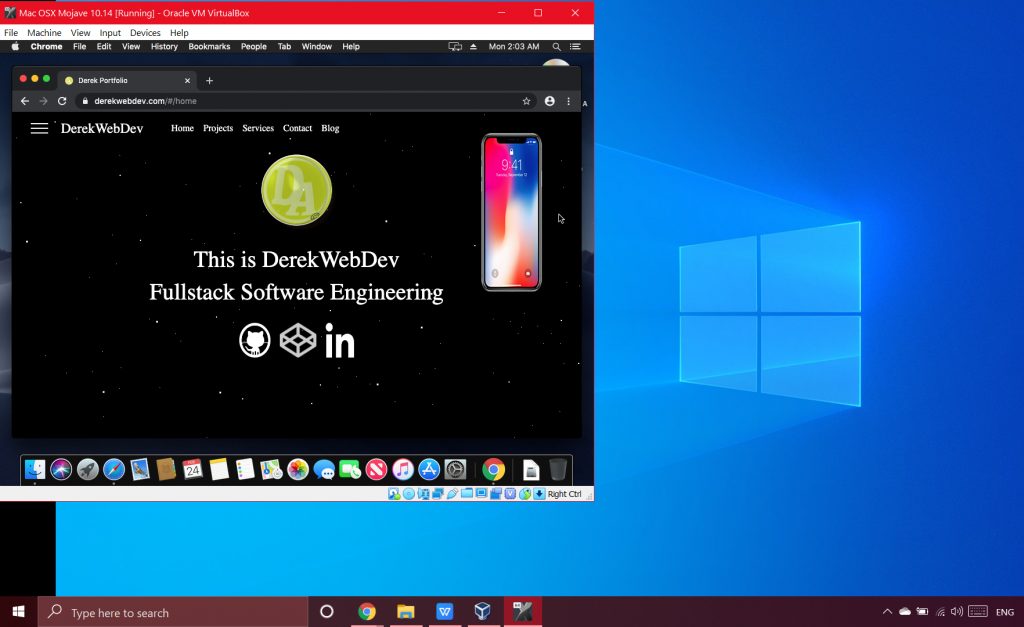
  1. A virtual environment is anything that a developer uses to emulate or simulate another machine’s function. Such as a server, cell phone, or an entire operating system system such as Linux or Mac/ Windows. In this article we will be focusing on setting up a Mac environment inside a Windows OS. But the same principles can be applied to your specific circumstance. We will using a tool be Oracle and we need a host machine with (usually Intel) Virtulization Technology (enabled) or capable. Our software of choice to achieve this will be VirtualBox by Oracle (although other solutions exist).
  2. We need a virtual environment in order to develop something locally and work out all the bugs before we put it into a production build and deploy it. Fairly straight forward.
  3. Anyone can be using a virtual environment sometimes without even knowing it. The most simple would be any “live server” extension added onto an IDE for something as simple as an html static page with hot reloading. Other virtual environments that are useful are local by Flywheel for WordPress and PHP Development and of course Node.js which is a JavaScript based server side scripting language usually used for React, React Native, Angular.js or Vue.js.

In this article we will be emulating a Mac OS inside Windows with a virtual environment being used for the development of an application and further Virtualization inside our Virtualization with an iPhone emulator. Expo is a common choice for this although there are others out there. When thought of like this it can become a little confusing. Imagine when you hold a mirror in-front of another mirror. This can give you an idea of how complex Virtualization Technology can become. But let’s keep things simple so we don’t become overwhelmed.

  • Which one is right for you? This answer is completely up to the developer, their specific solution needed and the type of hardware at their disposal. In this specific situation we have a gaming laptop running on Windows with 16gb of RAM and a fairly powerful GPU (graphics processing unit). We want to install Mac OS but first we must condition the computer with a .bat file (ore Windows batch file) to make the computer/ software understand what is happening with the foreign OS coming into play. Save the following with text file a .bat extension and “Run as Administrator”. We are using High Sierra Mac OSX in this instance so commands can be different depending on what you name the virtual machine and what OS you are installing. Please consult VirtualBox documentation and familiarize yourself with the software before starting.

—> https://www.virtualbox.org/wiki/Documentation

cd “C:Program Files\Oracle\VirtualBox”

VBoxManage.exe modifyvm “Your-VM-Name” –cpuidset 00000001 000306a9 04100800 7fbae3ff bfebfbff

VBoxManage setextradata “Your-VM-Name” “VBoxInternal/Devices/efi/0/Config/DmiSystemProduct” “MacBookPro11,3”

VBoxManage setextradata “Your-VM-Name” “VBoxInternal/Devices/efi/0/Config/DmiSystemVersion” “1.0”

VBoxManage setextradata “Your-VM-Name” “VBoxInternal/Devices/efi/0/Config/DmiBoardProduct” “Mac-2BD1B31983FE1663”

VBoxManage setextradata “Your-VM-Name” “VBoxInternal/Devices/smc/0/Config/DeviceKey” “ourhardworkbythesewordsguardedpleasedontsteal(c)AppleComputerInc”

VBoxManage setextradata “Your-VM-Name” “VBoxInternal/Devices/smc/0/Config/GetKeyFromRealSMC” 1

Hopefully with no errors we can now move on to installing the operating system.

  • Now that we have installed our virtual OS let’s talk about how to make it faster? Like I mentioned earlier we have several choices to make our Virtualized machine faster and the biggest constraint being your hardware. If you can try to install it all on an SSD for starters. Secondly you must tweak the settings in our VirtualBox to get the most we can out of our new environment. Turn the GPU settings up as high as possible and close all non-essential programs running on our host machine. Find a good balance on all your settings because it’s actually counter-productive to devote all resources to the virtual machine because it is piggy backing off our host unit. Find what works best for you and stick with it until you get the best performance. In the end I found myself with a very fast MacOS Virtual Machine.

Please remember the newest versions of things are not always the best. If you encounter any issues remember; Google is your best friend. You may need special bootloader files etc. https://www.geekrar.com/fix-efi-internal-shell-on-macos-mojave-on-virtualbox/ Any decent programmer has found themselves having to downgrade to previous releases because of backward compatibility issues. Thank you for reading and happy hacking!

React to WordPress API?

https://www.smashingmagazine.com/2018/03/react-wordpress-web-app/

I work with an interesting stack. React Front-End with a WordPress backend. A contact of mine shared this with me and I found it particularly interesting

US Post Office to Test-Drive Autonomous Trucks

The U.S. Postal Service on Tuesday announced a pilot project using self-driving trucks. It will conduct the two-week experiment in collaboration withTuSimple, an autonomous driving technology company based in San Diego.

TuSimple’s contract with the postal service calls for one of the company’s self-driving trucks to make five round trips hauling USPS trailers between Dallas and Phoenix.

Although the truck’s operation will be automated, humans won’t be left out of the picture entirely. A safety engineer and driver will be aboard to monitor vehicle performance and maintain public safety.

Cargo will travel along the I-10, I-20 and I-30 corridor through Texas, Arizona and New Mexico, a route that accounts for about 60 percent of the total economic activity in the United States.

That corridor also has certain advantages for automated vehicles, noted Robert Brown, TuSimple’s director of public affairs.

“You’re not going to see us on I-90,” he told TechNewsWorld. “We can handle high winds, darkness and rain, but we have not mastered snow yet.”

They Drive by Night

The pilot is just one of the many ways the postal service is innovating and investing in its future, according to a statement provided to TechNewsWorld by spokesperson Kim Frum.

“We are conducting research and testing as part of our efforts to operate a future class of vehicles which will incorporate new technology to accommodate a diverse mail mix, enhance safety, improve service, reduce emissions, and produce operational savings,” the USPS notes.

Long-haul routes with short turnaround times, such as the 22-hour journey in the pilot, are well suited for self-driving trucks, according to TuSimple.

“Right now, human drivers are constrained by 11 hours a day,” TuSimple’s Brown said. “We can stretch that out with these trucks.”

One of biggest challenges facing TuSimple now is finding teams to accompany its automated trucks. Overnight requirements and close quarters aren’t an attractive combination, especially in the middle of a truck driver shortage. The American Trucking Association estimates that shortage will reach 175,000 by 2024.

“Right now we have a truck driver on the left seat and a safety engineer riding right seat,” Brown explained. “Eventually we’ll be able to pull those folks out.”

5G Could Mess With Accuracy of Weather Forecasts

Next-generation 5G mobile communications technology could have a harmful impact on weather forecasting in the United States, based on expert testimony presented before a U.S. House committee during a hearing on the future of weather forecasting.

Interference from 5G wireless phones could reduce the accuracy of weather forecasts by 30 percent, said Neil Jacobs, Acting Under Secretary of Commerce for Oceans and Atmosphere at NOAA. Jacobs made the remarks to members of the Environment Subcommittee of the House Committee on Science, Space, and Technology.

The effect would be to return forecasting accuracy to 1980s levels, Jacobs added.

Consumers and government agencies rely on accurate weather information, and it also can be important for disaster preparedness and recovery, noted the Aerospace Industries Association, an industry advocacy group, in a letter to the committee.

“Interference-free radio frequency spectrum communications that allow for accurate readings make these applications possible,” the AIA maintained.

“Unfortunately, today’s spectrum reality could directly impact the future of accurate weather readings,” the association continued. “Spectrum is a finite resource and as the Federal Communications Commission (FCC) looks to free up spectrum for emerging technologies like 5G, the risk of interference with existing users rises, in both the incumbent band and the adjacent bands.”

The risks to weather forecasting came to light as the FCC prepared to auction off the 24 GHz spectrum, according to the letter.

“While it was a multi-year process to get to the auction itself, it is unclear if the proper testing to ensure that harmful interference with weather equipment in the directly adjacent band would not take place had been conducted fully,” the organization asserted.

Significant Security and Safety Implications

Just days before the House hearing, two Democratic senators, Ron Wyden of Oregon and Maria Cantwell of Washington, sent a letter to FCC Chairman Ajit Pai requesting that he block any companies from operating in the 24 GHz band until weather forecasting operations were protected.

“To continue down the path the FCC is currently on, to continue to ignore the serious alarms the scientific community is raising, could lead to dangerous impacts to American national security, to American industries, and to the American people,” the senators wrote.

The FCC began auctioning spectrum in the 24 GHz band despite the objections of NASA, NOAA and members of the American Meteorological Society, Wyden and Cantwell pointed out. Those organizations asserted that the out-of-band emissions from broadband transmissions in the 24 GHz band would disrupt the ability to collect water vapor data measured in a neighboring band used by meteorologist to forecast the weather.

“The national security and public safety implications of this self inflicted degradation in American weather prediction capabilities would be significant,” the senators wrote.

They cited a U.S. Navy report released in March, which found the amount of interference to weather satellites permitted by future commercial broadband uses in the 24 GHz band at the FCC’s emission levels would result in increased risk in flight and navigation safety, as well as degrade battle space awareness.

The Rebirth of the Personal Computer

I went to Lenovo Accelerate last week and feasted my eyes on one of the most innovative PCs I’ve ever seen. However, as I absorbed the rest of Lenovo’s announcements, I realized I was looking at just the tip of what could be a significant coming change in personal computers — one that could eclipse every change we have seen so far.

I’ll share my thoughts about that change and then close with my product of the week: the Lenovo Smart Tab — another innovative product from Lenovo that blends the features of an Amazon Echo with a tablet.

Foldable Screen Laptop

It is interesting that Lenovo is doing the old Jobs “one more thing” better than Apple is at the moment. I remain flabbergasted that Tim Cook effectively has thrown out virtually every practice that made Apple the power it was in the early part of this century and instead has been running that company into the ground.

That certainly has given companies like Lenovo an opportunity, and they have been stepping up with a series of laptop improvements that should, when complete, make tomorrow’s laptop so different from today’s laptops that they’ll likely have a different name.

Lenovo’s “one more thing” is a coming foldable screen laptop that is semi-hardened to military specifications, can fold down to something that is nearly in the size class of a smartphone. It gives up almost nothing in performance, while having all-day battery life and a persistent (likely 5G) connection.

Unfolded, it has a 13.3-inch OLED screen that has no visible seam when opened, making it the closest thing to a perfect e-book I’ve every seen.

The presenters brought this out at the end of the Lenovo Accelerate keynote, and I doubt there was a single person in the audience who didn’t want the damn thing. They’ll have to wait, though, because it isn’t due until 2020.

This wasn’t the only announcement at the event, however, and I think the blend of the things that Lenovo showcased eventually will result in an even more revolutionary result.

New Materials

Like the failed IBM TransNote and the impressive HP Spectre Folio, Lenovo’s new foldable laptop will be covered in leather. I now have two leather-covered notebooks — that HP Folio and a Microsoft Surface Book covered in leather. (It’sfrom Toast, which also offers a wood cover that I’ve used — I like the leather much more.)

Leather makes a notebook, particularly one you want to use as a tablet or e-book, far more comfortable to carry. It is a much bigger difference than you think, and having experienced it with two products, I have a hard time wanting to carry a notebook not covered in leather.

The one exception would be a notebook covered in open weave real carbon fiber like that used in high-end exotic cars. I’m big car guy (we recently moved from a house that had a three-car garage to a smaller house with a six-car garage, because I feel I got my priorities straight).

Other PC makers, including Lenovo, have used carbon fiber in the past, but they tend to paint over it, losing the carbon fiber cool factor. Well, Lenovo is going to get carbon fiber right in one of its coming Halo notebook products, and it won’t be the last to do so.

Granted, this may play to a mostly male audience, but that same audience generally chases high-performance notebooks as well, and since I’m in that group I’m certainly excited.

Stepped-Up Security

Now one of the features that HP has made very popular is the electronic security screen. HP stepped out aggressively with what I still think is one of the most important security offerings brought to market. It recently improved that offering to reduce power and display a black screen to the unauthorized observer rather than a bright white screen.

What a security screen does is polarize the view so that only the person sitting directly in front of the screen can see what is on it. This is particularly useful if you are watching almost any current movie, and the obligatory but typically unnecessary sex scene pops up unannounced. However, it also prevents someone from seeing the confidential crap a lot of executives work on while flying or in public spaces.

There are folks who book seats on planes specifically to see what an executive is working on. The last time I checked, these efforts were mostly to try to get an illegal jump on the stock market, but with state players trying to steal intellectual property and large companies once again forgetting the risks of IP theft, this exposure is more problematic than most realize.

What Lenovo showcased was the first smart implementation of a security screen I’ve seen. You see, a lot of folks who have the screen don’t turn it on, because it reduces power and screen brightness. What one of the equipped Lenovo laptops does is watch for illicit viewers and then automatically fire up the screen — both protecting the data and privacy, and alerting the user that someone potentially is trying to steal the IP they are working on. This kind of active defense likely will define the next wave of personal computers and even smartphones, as we adapt to the world of state-funded IP theft and blackmail.

Copyright © All rights reserved www.DerekWebDev.com